Shopify Duplicate Content: Why It Hurts Rankings and How to Fix It
Shopify duplicate content occurs when multiple URLs on your store display identical or near-identical content, causing search engines to split ranking authority across competing pages rather than concentrating it on one strong URL. The most common causes are collection-scoped product URLs, pagination parameters, tag pages, and filter parameters. Left unfixed, these issues directly reduce organic traffic, waste crawl budget, and prevent your best pages from ranking where they should.
Does Shopify Have Duplicate Content Issues?
Yes, and the scale is larger than most store owners realise. Shopify duplicate content kills organic rankings for 73% of ecommerce stores. Product URLs, pagination, and domain variants create thousands of duplicate pages that confuse search engines and split ranking power.
Studies show that 68% of Shopify stores have more than 500 duplicate URLs indexed by Google, with enterprise stores averaging 2,847 duplicate pages. This happens because Shopify generates URLs for pagination, sorting parameters, filtering options, and tracking codes, all pointing to content variations that search engines treat as separate pages.
The consequence is concrete and measurable. Research from Ahrefs analysing 47,000 ecommerce sites found that stores with more than 1,000 duplicate pages receive 34% less organic traffic than comparable stores with proper canonicalisation.
This is not a flaw unique to badly-built stores. It is a structural feature of how Shopify’s URL architecture works, and fixing it requires understanding exactly which duplicates Shopify handles automatically and which ones it does not.
Why Does Shopify Create Duplicate Content?
Shopify generates duplicate content through five distinct mechanisms. Understanding each one is essential before attempting any fix.
1. Collection-Scoped Product URLs (The Biggest Problem)
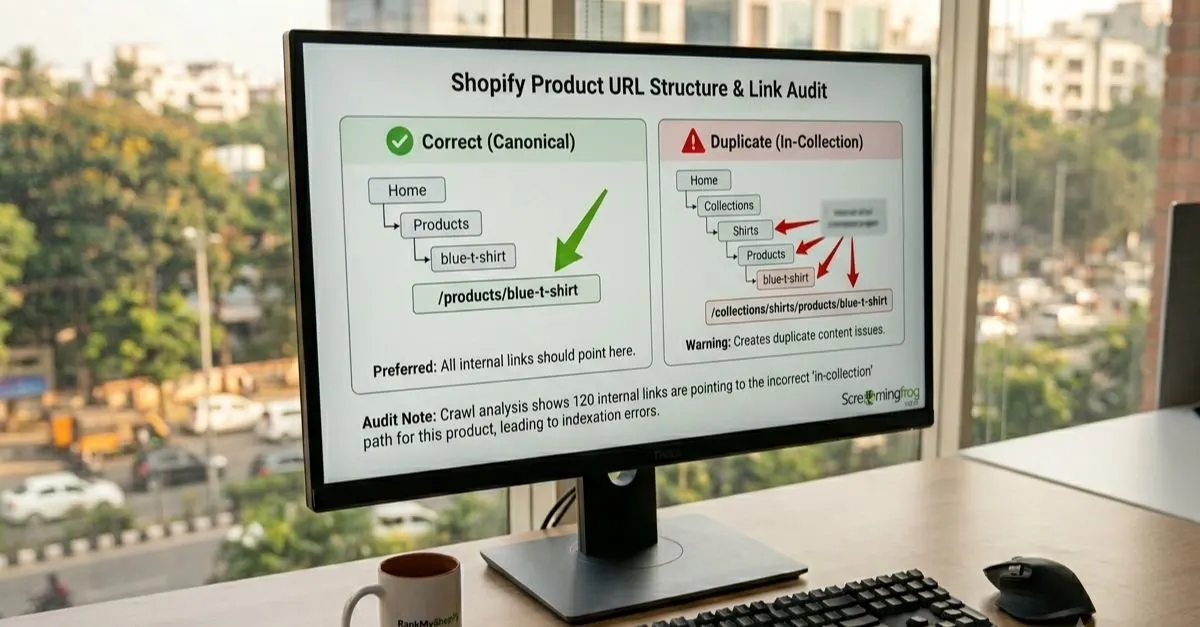
Every Shopify product has a canonical URL at /products/your-product-handle. However, Shopify also automatically creates a second accessible URL for every collection that product belongs to: /collections/collection-name/products/your-product-handle.
Shopify sets up its product URLs so that they update dynamically to contain the name of the collection the user originated from. While Shopify’s canonical tag properly points search engines to the preferred version of the URL, internal links still point to the various non-canonical versions throughout the site. SellersCommerce
The mathematics of this problem are staggering. A 500-product store where products average 3 collections and 3 variants creates 500 multiplied by 8 URLs for each product, equalling 8,000 crawlable URLs for just 500 actual products.
And critically: Google ignores canonical tags 30-40% of the time when other signals conflict. So even though Shopify adds canonical tags automatically, Google frequently indexes the wrong URL anyway. The most impactful fix is changing your internal links to point to canonical URLs, aligning all signals so Google has no reason to pick the wrong URL.
2. The Pagination Gap
The first collection page exists at two URLs: /collections/shoes and /collections/shoes?page=1, both serving identical content. Shopify does not canonicalise the ?page=1 variant to the base URL. That is a free duplicate for every collection with pagination.
This is one of the most commonly missed issues in Shopify SEO guides because most store owners assume Shopify handles pagination automatically. It does not handle the ?page=1 case.
3. Collection Tag Pages
When you use Shopify’s tagging system, the platform automatically generates tag-filtered collection URLs such as /collections/shirts/red or /collections/shirts/blue. These tag pages often contain overlapping or identical products to your main collection pages, creating near-duplicate content at scale.
Shopify tags create URLs like /collections/shirts/red and /collections/shirts/blue. These tag pages often contain overlapping products, creating near-duplicate content. A product tagged “red” and “sale” appears on both tag pages.
4. Filter and Sort Parameter URLs
Third-party filter apps and Shopify’s native sorting functionality create a crawlable URL for every parameter combination a customer selects. URLs like /collections/shoes?sort_by=price-ascending or /collections/shoes?filter.v.availability=1 generate unique, indexable pages with essentially identical content.
URL parameters for sorting, filtering, and tracking create infinite duplicate content variations on Shopify collection and product pages. We have seen Shopify stores with 50,000 or more indexed parameter URLs when they should have 500 clean pages.
5. Product Variant URLs (Mostly Handled by Shopify)
Product variants such as size and colour create URLs with query parameters (?variant=12345). This is one area where Shopify’s defaults work correctly.
Shopify automatically canonicalises all variant URLs to the base product URL, which is correct behaviour for 95% of stores. A t-shirt available in 5 sizes and 8 colours (40 variants total) all canonicalise to /products/t-shirt.
The one exception: if specific variants have their own meaningful search demand (for example, “red Nike Air Max” vs “blue Nike Air Max”), consider building those as separate products rather than variants so they can rank independently.
What Is a Canonical Tag and How Does Shopify Use It?
A canonical tag is a line of HTML code that tells search engines which URL is the authoritative version of a page when duplicate or near-duplicate versions exist. Shopify themes automatically identify and determine the canonical version of a web page based on the structure of your ecommerce website and content.
However, Google’s own documentation is clear that canonical tags are hints, not directives. Google may choose to override them, and it frequently does when the signals it receives contradict the canonical tag.
Google overrides your canonical tag when internal links contradict the canonical, pointing to /collections/X/products/Y while the canonical says /products/Y. Backlinks pointing to the wrong URL also tip the balance toward the non-canonical version.
This is why canonical tags alone are not sufficient. The full fix requires aligning three signals simultaneously: the canonical tag itself, your internal links, and your sitemap. When all three point to the same URL, Google has no justification for choosing a different canonical.
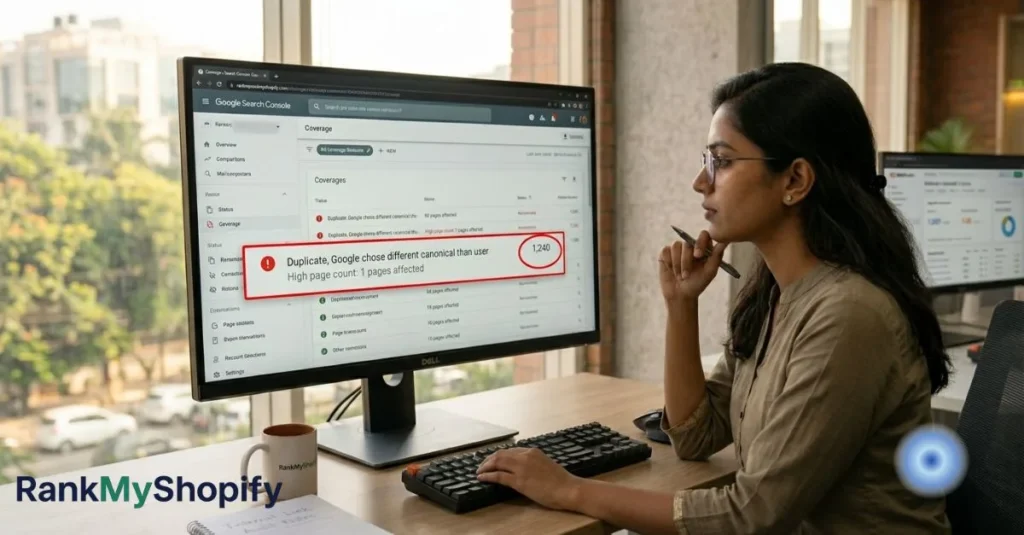
What Does “Duplicate, Google Chose Different Canonical Than User” Mean in Search Console?
This warning in Google Search Console’s Coverage report means Google found your canonical tag, considered it, and overruled it in favour of a different URL. It is a clear signal that your internal links or backlink profile are contradicting your canonical tags and that the issue requires a technical fix, not just a canonical tag update.
How to Fix Shopify Duplicate Content: Step-by-Step
Work through these fixes in order of impact. The first two deliver the greatest ranking improvements for most Shopify stores.
Fix 1: Change Collection Grid Links to Point to Canonical Product URLs
This is the single highest-impact fix available for Shopify duplicate content. The root cause is the within: collection Liquid filter in your theme templates, which causes collection product grids to link to collection-scoped URLs instead of canonical product URLs.
By removing the within: collection filter from the Liquid code, all canonical product URLs become visible from any collection page. This process will not eliminate the collection URL; it will still be a live page with a canonical tag pointing to the product page. Do not mark the collection URLs as noindex.
The code change to look for in your theme files is in the collection template (typically collection.liquid or main-collection-product-grid.liquid depending on your theme). The change removes the within: current_collection modifier from the product URL output so that all grid links resolve to /products/[handle] rather than /collections/[handle]/products/[handle].
If you are not comfortable editing Liquid theme files, this is a service RankMyShopify provides as part of our Shopify technical SEO service. We have applied this fix across stores in India, the USA, the UK, and Australia since 2009.
Fix 2: Add a Canonical Tag for the ?page=1 Pagination Duplicate

Shopify does not handle this automatically. Add the following conditional canonical logic to your collection.liquid or theme.liquid file:
{% if template contains 'collection' and current_page != 1 %}
  <link rel="canonical" href="{{ shop.url }}{{ collection.url }}" />
{% else %}
  <link rel="canonical" href="{{ canonical_url }}" />
{% endif %}
This ensures that all paginated pages beyond the first point their canonical to the main collection URL, concentrating SEO authority on the primary collection page rather than fragmenting it across paginated variants.
Fix 3: Noindex Collection Tag Pages
If your tag pages serve primarily as filtered views rather than unique content destinations, add a noindex directive to prevent them from competing with your main collection pages.
To noindex tag pages, add this to your collection template: if the template contains collection and current tags are present, output a noindex, follow robots meta tag alongside a canonical tag pointing to the base collection URL. This tells Google to follow the links on these tag pages but not to index them as separate ranking pages.
Fix 4: Control Filter and Sort Parameter URLs
For stores using third-party filter apps, work with your app provider to ensure filter parameters are either handled via JavaScript (without creating new crawlable URLs) or are excluded from crawling via Shopify’s robots.txt configuration. Shopify’s default robots.txt blocks sort_by parameters but does not block filter parameters by default.
Fix 5: Audit and Clean Your Sitemap
If you see non-canonical URLs in your sitemap, your theme may be overriding the default sitemap behaviour. Check for custom sitemap templates and remove any collection-aware product URLs. Your sitemap should only include canonical URLs: /products/[handle], your main collection pages (not paginated or tag-filtered variants), and your blog posts and static pages.
How Does Shopify Duplicate Content Affect AI Search Rankings?
This is the dimension that almost no Shopify SEO guide covers, and it is becoming increasingly important in 2026.
Duplicate content does not just affect Google rankings; it hurts your visibility in AI-powered search too. Bing’s webmaster team confirmed in December 2025 that LLMs cluster near-duplicate URLs and select one representative page, which may be outdated or the wrong version of your product. When ChatGPT, Perplexity, or Google AI Mode encounters multiple versions of your product page, they pick one at random, and it might be the collection-filtered version with less information.
Additionally, the August 2025 Google spam update specifically targeted ecommerce sites with template-based duplicate content. Cleaning up duplicates is no longer just a best practice; it is protection against ranking penalties.
For Shopify stores investing in GEO (Generative Engine Optimisation) and AEO (Answer Engine Optimisation) to appear in AI search citations, clean canonical URLs with consistent structured data are the foundation that makes everything else work.
A Real-World Example: How Duplicate Content Compounds on a Mid-Size Shopify Store
Consider a Shopify fashion store in India or the USA with 300 products, each appearing in an average of three collections. The store uses a popular filter app and product tags for internal organisation.
Without any fixes in place, this store would have approximately:
- 300 canonical product pages at
/products/[handle] - 900 additional collection-scoped product URLs at
/collections/[handle]/products/[handle](3 per product) - 30 or more tag pages from Shopify’s tagging system
- Potentially hundreds of filter parameter URLs from the third-party app
- Pagination duplicates from
?page=1across all collection pages
This means a store with 300 real products may have 2,000 to 5,000 or more crawlable URLs. Google’s crawl budget allocation for a store this size is typically 100 to 500 pages per day. When the majority of that budget is spent on duplicate URLs, newly added products may take weeks or months to get indexed, and your best collection pages may never consolidate enough authority to reach the top positions.
A Shopify SEO audit from RankMyShopify maps every duplicate URL type present in your store and provides a prioritised fix list with the code changes and configuration steps needed to resolve each one.
How to Check for Duplicate Content on Your Shopify Store
Use these tools and checks to identify the scale of the problem on your specific store:
- Google Search Console Coverage Report. Navigate to Index > Pages. Look for “Duplicate, Google chose different canonical than user” and “Alternate page with proper canonical tag.” A high count of either warning confirms you have a canonical conflict requiring a fix.
- Google Search Console indexed page count. Compare the total indexed pages against your actual page count (products plus collections plus blog posts plus static pages). If the indexed count is significantly higher than expected, you have a duplication problem.
- Screaming Frog or Ahrefs Site Audit. Crawl your store and review the duplicate content report. Semrush flags pages with 85% or more content similarity. Export the internal links report and check how many links point to non-canonical URLs versus canonical ones.
- Manual URL inspection. In your browser, navigate to a collection page and hover over product links. If the URLs showing in the status bar contain
/collections/[name]/products/[handle]rather than/products/[handle], you have the default Liquid filter issue. - Search Console URL Inspection Tool. Check individual product pages to confirm which URL Google has selected as the canonical. If it does not match your
/products/URL, the canonical fix is needed.
Shopify Duplicate Content: Key Facts and Priority Fix Table
| Issue Type | Handled by Shopify Automatically | Priority Fix |
|---|---|---|
| Collection-scoped product URLs | Partial (canonical tag only; internal links still wrong) | Critical: Fix 1 |
| ?page=1 pagination duplicate | No | High: Fix 2 |
| Collection tag pages | No | High: Fix 3 |
| Filter and sort parameter URLs | Partial (sort_by only, via robots.txt) | Medium: Fix 4 |
| Product variant URLs | Yes (canonical points to base product URL) | Low: Monitor only |
| WWW vs non-WWW domain | Yes (Shopify platform level) | No action needed |
| HTTPS vs HTTP | Yes (Shopify platform level) | No action needed |
Frequently Asked Questions About Shopify Duplicate Content
Q: Does duplicate content hurt Shopify SEO?
A: Yes, directly. Duplicate content splits your ranking signals across multiple URLs, preventing any single page from accumulating enough authority to rank strongly. Shopify stores with more than 1,000 duplicate pages indexed by Google receive 34% less organic traffic on average than comparable stores with clean canonicalisation, according to an Ahrefs analysis of 47,000 ecommerce sites.
Q: Does Shopify fix duplicate content automatically with canonical tags?
A: Shopify adds canonical tags automatically for products and collections, but this only partially addresses the problem. Google treats canonical tags as hints rather than directives and ignores them 30-40% of the time when other signals (particularly internal links) contradict them. Shopify also does not automatically handle the ?page=1 pagination duplicate or noindex collection tag pages.
Q: What causes the most duplicate content on Shopify?
A: The most common cause is the collection-scoped product URL, where every product has an accessible URL under each collection it belongs to (for example /collections/shirts/products/blue-t-shirt) in addition to its canonical URL (/products/blue-t-shirt). The second most common cause is pagination, specifically the ?page=1 parameter creating an identical copy of your base collection page.
Q: How do I fix Shopify canonical tag issues without breaking my store?
A: The safest approach is editing the Liquid theme file to remove the within: collection filter from collection product grid URLs, and adding conditional canonical logic for paginated pages. These changes do not affect the user experience or remove any pages; they only change which URL is used in internal links and canonical declarations. Always test in a development theme before applying changes to your live store. If you are not comfortable with Liquid code, RankMyShopify’s technical team handles this routinely for stores in India, the USA, the UK, and Australia.
Q: What is the “Duplicate, Google chose different canonical than user” warning in Search Console?
A: This warning means Google found your canonical tag, considered it, and overruled it in favour of a different URL. It indicates that your internal links or backlink signals are contradicting your canonical tag, giving Google a reason to prefer the non-canonical version. It requires a technical fix to align internal links with your canonical declarations, not just a canonical tag update.
Q: Does Shopify pagination SEO cause duplicate content?
A: Yes, in two ways. First, /collections/shoes and /collections/shoes?page=1 serve identical content, and Shopify does not automatically canonicalise the ?page=1 version to the base URL. Second, paginated pages beyond page 1 often share the same H1, meta title, and meta description as the main collection page, creating metadata duplication that weakens the entire collection’s ranking potential.
Q: How do I audit Shopify duplicate content?
A: Start with Google Search Console’s Coverage report and look for “Duplicate, Google chose different canonical than user” and “Alternate page with proper canonical tag” warnings. Then crawl your store using Screaming Frog or Ahrefs Site Audit. Compare your total indexed page count in Search Console against your actual page count. If the indexed count is significantly higher, you have a duplication problem that requires attention.
Ready to fix duplicate content on your Shopify store and rebuild your organic rankings? Contact RankMyShopify today on 9888923755, email us at info@rankmyshopify.com, or visit https://rankmyshopify.com/ for a free Shopify SEO consultation. With over 15 years of exclusive Shopify SEO experience, our team has resolved these exact technical issues for stores across India, the USA, the UK, Australia, and Canada since 2009.
Ready to scale your Shopify store?
Book a free 30-minute growth call with our Shopify specialists. We’ll audit your store and share an actionable roadmap — no obligations.