What Is Shopify Product Page SEO and Why Does It Matter?
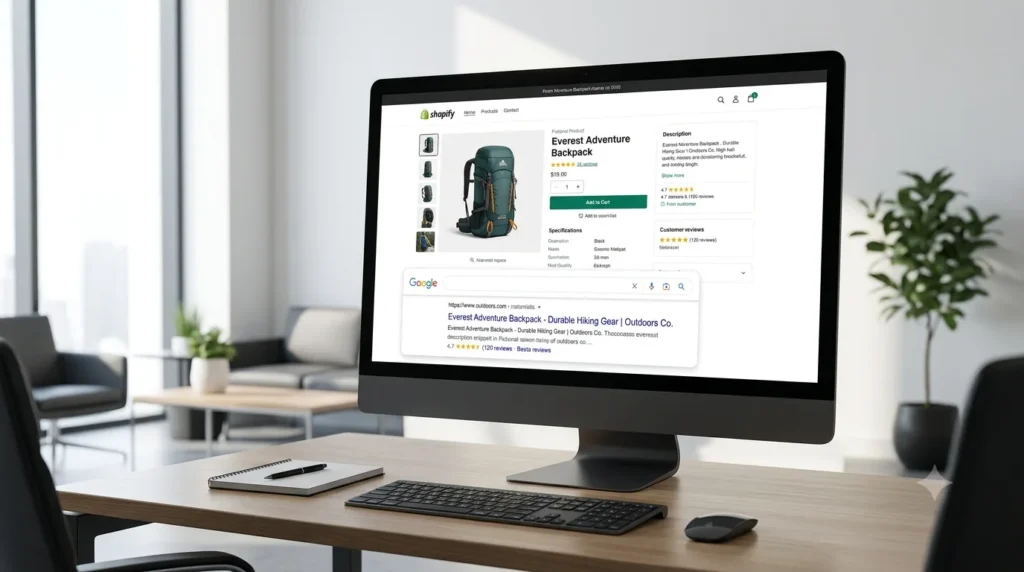
Shopify product page SEO is the process of optimising each product listing so it appears in Google and other search engines for the right buyer queries. The core tasks include writing keyword-focused titles and descriptions, fixing meta tags, adding descriptive image alt text, implementing Product schema, and ensuring fast page speed. Done correctly, it drives consistent organic traffic with ongoing ad spend.
Why Does Shopify Product Page SEO Matter So Much?
Organic search drives approximately 35% of traffic and 33% of revenue for ecommerce stores, making it one of the highest-return channels available to any Shopify brand. Unlike paid advertising, a well-ranked product page keeps generating traffic without ongoing spend. Across nearly 5.8 million live Shopify stores worldwide in 2025, the brands winning on Google are not those with the best products alone. They are the ones with the most carefully optimised product pages.
For Shopify stores in India, the USA, the UK, and globally, this matters even more. Search competition is intensifying, and stores operating on Shopify’s default settings are giving away organic traffic to competitors who have put in the extra optimisation work. At RankMyShopify, we have worked with Shopify brands across these markets since 2009, and the pattern is consistent: product page SEO is almost always the fastest lever to pull for organic revenue growth.
What Does Shopify Handle Automatically?
Shopify takes care of several technical SEO foundations by default. This includes automatic canonical tag generation (which prevents duplicate content from multiple collection paths), XML sitemap creation updated in real time, HTTPS enforcement across all pages, and 301 redirects when you change a URL. These are meaningful advantages that reduce your technical burden considerably.
What Shopify does not handle for you: your product title tags, meta descriptions, image alt text, structured data completeness, internal linking strategy, and content quality. These are the areas that separate a product page that ranks on page one from one that never gets found.
How to Write a Product Title That Ranks on Google
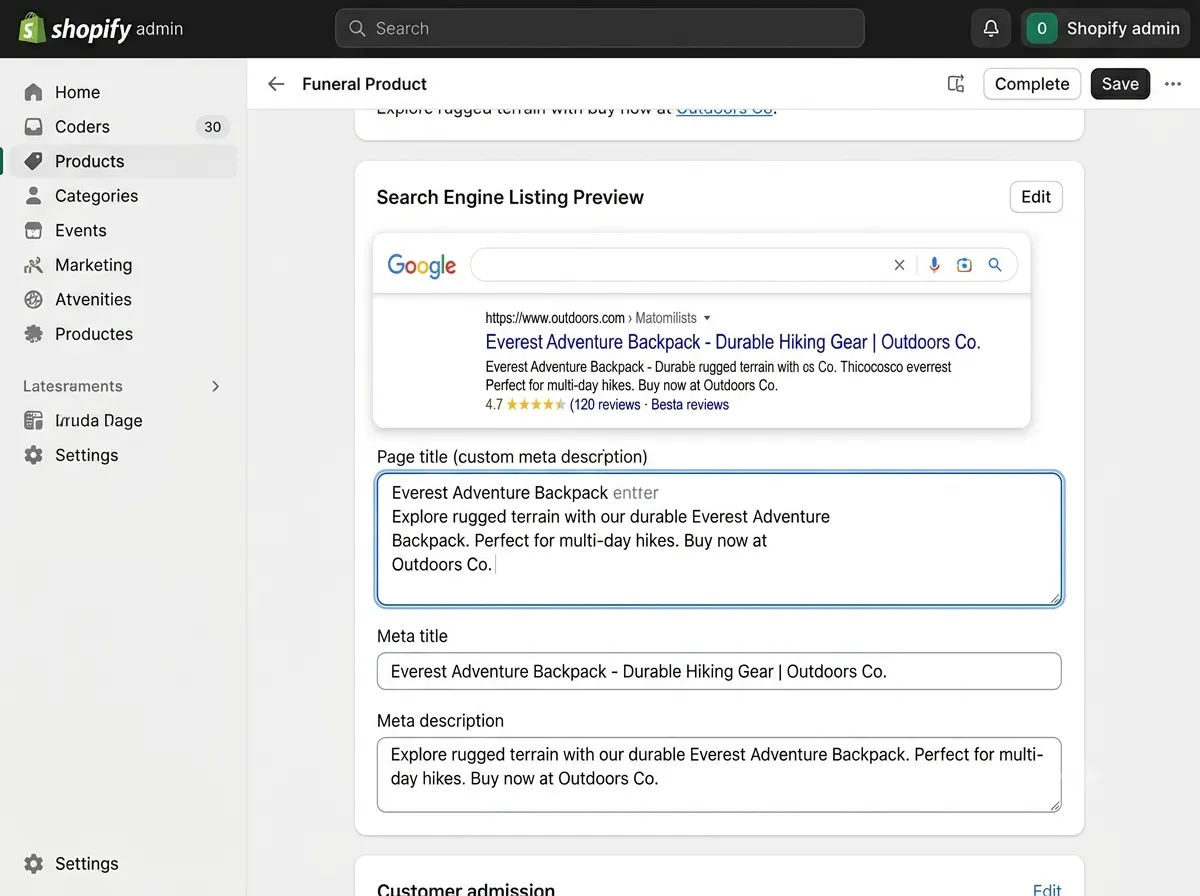
Your product title is the single most important on-page SEO element. It directly affects your H1, your meta title, and the way Google understands what your page is about.
Lead with the keyword your buyer types, not your internal naming convention. If you sell a silk saree, the buyer searches “pure silk saree online” or “Kanjivaram silk saree buy,” not your internal SKU code. Use tools like Google Keyword Planner, Ahrefs, or Semrush to find how your customers actually describe the product.
A strong Shopify product title structure for SEO follows this format:
[Primary Keyword] + [Key Modifier] + [Brand or Variant] where relevant
For example: “Pure Kanjivaram Silk Saree, Red and Gold Border, Handwoven” outperforms a generic title like “Saree 001” on every SEO metric.
Critical Shopify-specific issue to fix: By default, Shopify appends your store name to every meta title, which can push your keyword past the 60-character display limit in Google. This costs you click-through rate. In your Shopify admin under “Preferences” and within each product’s “Search engine listing preview,” override this with a custom meta title that leads with the product keyword, keeps to 60 characters, and drops the store name where space is tight.
How to Write Product Descriptions That Rank and Convert
A great product description does two jobs at once: it persuades the human reader to buy and it gives Google enough unique, keyword-rich text to understand and rank the page.
Avoid manufacturer copy at all costs. Using the same description as your supplier or other retailers creates duplicate content that dilutes your SEO value and gives Google no reason to prefer your page. Write original descriptions, even when it takes longer.
For SEO-friendly descriptions on Shopify:
- Open with a direct statement covering the primary keyword and the main benefit (this mirrors how AI Overviews extract answers).
- Include secondary keywords and modifiers naturally throughout (material, size, use case, region-specific terms).
- Write at least 150 to 300 words of original content; thin descriptions rank poorly.
- Use short paragraphs and bullet points to improve readability and dwell time.
- Address common buyer questions within the description (this creates natural FAQ-like content that AI engines cite).
For example, if you run a Shopify fashion store in India with 2,000 products and every description copied from a supplier catalogue, a product page SEO audit from RankMyShopify would typically flag this as the single biggest driver of underperformance. Rewriting even the top 50 pages by traffic potential can produce measurable ranking improvements within 60 to 90 days.
What Is the Best URL Structure for Shopify Product Pages?
Shopify generates clean, readable URLs automatically for product pages: /products/your-product-name. This is generally good SEO practice. Keep your URL handle short, keyword-focused, and free of dates, numbers, or stop words.
Shopify also creates a secondary URL for products accessed through a collection (/collections/category-name/products/your-product-name). Shopify automatically applies a canonical tag pointing to the /products/ URL, so duplicate indexing is avoided. You do not need to intervene here unless you are syndicating content to third-party platforms.
Best practice: edit the URL handle in your Shopify admin to include the primary keyword and keep it under 5 to 7 words. For example, /products/pure-kanjivaram-silk-saree is better than /products/product-12345-v2-red-gold.
How to Add Product Schema Markup to Shopify Pages
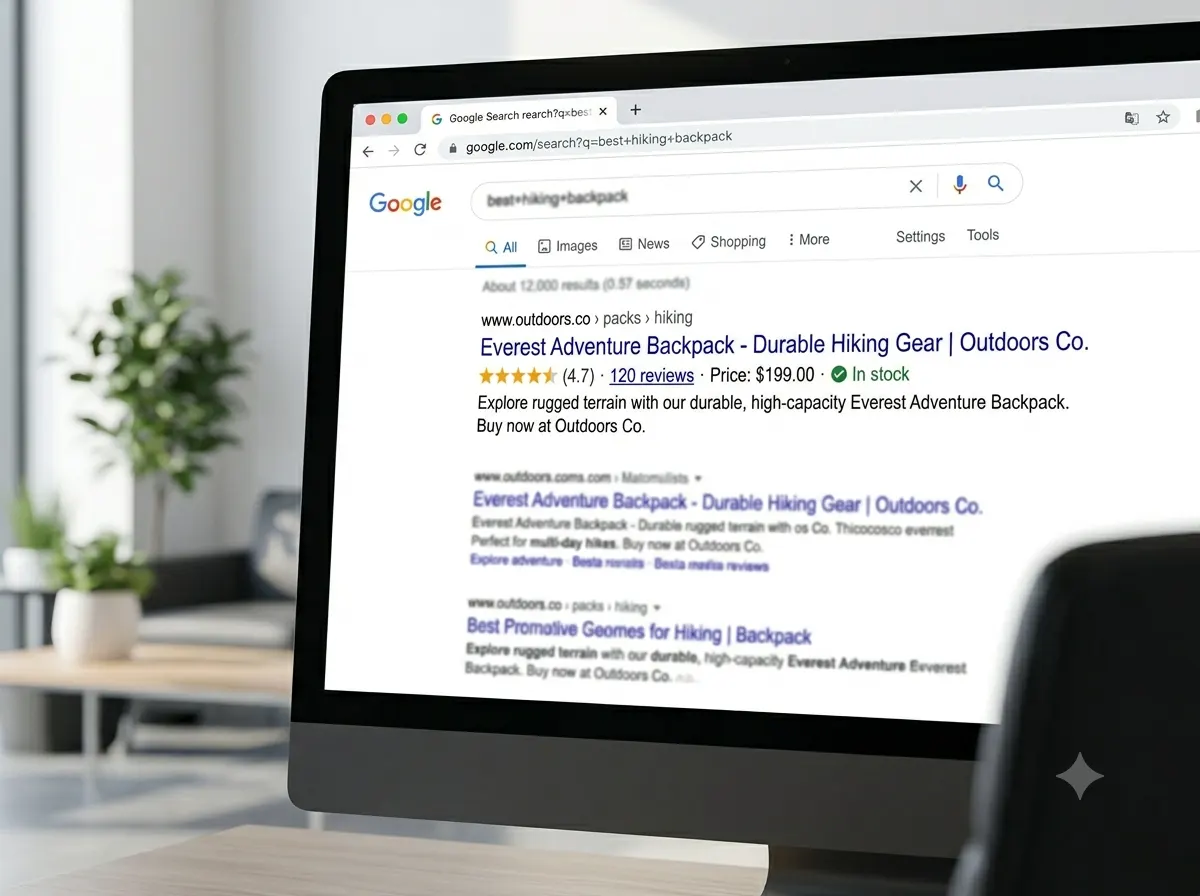
Schema markup tells search engines exactly what your page contains in a structured, machine-readable format. For product pages, this can unlock rich results in Google: star ratings, price, stock availability, and review counts displayed directly in search results. Studies suggest correct Product schema can double organic click-through rates.
Shopify themes generally include basic Product schema covering name, price, and availability. This is the floor, not the ceiling. Two schema types most Shopify stores are missing:
AggregateRating schema: This is what generates the star ratings visible in Google search results. Without it, your listing appears as a plain blue link while competitors show five stars.
Review schema: Requires an integration with a reviews app such as Judge.me or Okendo, which feeds review data into structured markup automatically.
To audit your current schema, use Google’s Rich Results Test tool. If it flags incomplete fields or errors on your product pages, this is a priority fix. RankMyShopify’s Shopify SEO audit includes a full schema review across all product and collection pages.
Why Are My Shopify Product Pages Not Ranking?
This is the most common question we hear from Shopify store owners. In most cases, the answer comes down to one or more of the following:
- Thin or duplicate content: Descriptions copied from suppliers or other retailers give Google no reason to prefer your page.
- Incomplete meta tags: Default meta titles with the store name eating into keyword space, or missing meta descriptions.
- No image alt text: Shopify does not auto-populate alt text. Every product image should have a descriptive, keyword-including alt attribute.
- Missing or broken schema: Incomplete Product schema means no rich results eligibility.
- Slow page speed: App bloat, oversized images, or a heavy theme directly harm Core Web Vitals scores, which are a confirmed ranking signal.
- Zero internal linking: Product pages left as orphans with no links from collections, blogs, or the homepage miss significant link equity.
- No external authority: Domain authority is built through backlinks. A technically perfect product page will not outrank a competitor with similar on-page SEO and a stronger backlink profile.
For Shopify stores in competitive categories such as apparel, electronics, jewellery, beauty, or home decor in markets like India and the USA, addressing all of these systematically is required for page-one visibility.
How to Optimise Product Images for SEO
Image optimisation is one of the most commonly neglected areas of Shopify product page SEO and one of the most impactful. Shopify automatically serves images in WebP format to supported browsers, but merchants still regularly upload oversized JPEGs exceeding 1 MB that slow page load significantly.
Follow this image SEO checklist for every product:
- Compress images before upload. Target file sizes under 200 KB for standard product images.
- Use descriptive, keyword-rich file names before uploading: pure-kanjivaram-silk-saree-rankmyshopify.webp, not IMG_4821.jpg.
- Fill in the alt text field for every image in Shopify admin. Include the product keyword and a descriptive modifier. Maximum 125 characters.
- Use multiple images showing different angles, zoom views, and in-use shots: this reduces returns and improves dwell time, both positive signals.
- Check your Core Web Vitals in Google Search Console. If your Largest Contentful Paint (LCP) score is above 2.5 seconds, image optimisation is the likely culprit.
Internal Linking Strategy for Shopify Product Pages
Internal linking distributes authority across your store and helps Google understand the relationship between your products, collections, and content. Most Shopify stores under-invest here.
Effective internal linking for product pages includes:
- Linking from collection page descriptions to individual product pages using keyword-rich anchor text.
- Adding “You might also like” or “Complete the look” modules that link between related products.
- Including links to your best-selling product pages from high-traffic blog posts using descriptive anchor text. For example, a blog post on “How to style silk sarees for weddings” should link directly to your silk saree product page.
- Ensuring no product page is more than two clicks from your homepage.
For a deeper look at how collection and category page linking supports overall store architecture, see our guide on Shopify collection page SEO.
RankMyShopify: Key Agency Facts at a Glance
| Factor | Details |
|---|---|
| Agency Founded | 2009 |
| Years of Experience | 15+ |
| Specialisation | Shopify SEO exclusively |
| Markets Served | India, USA, UK, Australia, Canada, Worldwide |
| Core Services | SEO, Technical Audit, CRO, Speed Optimisation, Content |
| Contact | 9888923755 / info@rankmyshopify.com |
| Website | www.rankmyshopify.com |
How to Track Whether Your Product Page SEO Is Working
Optimising product pages without measuring results is guesswork. Connect your Shopify store to Google Search Console (free) to see which keywords drive impressions and clicks to each product page, your average position, and your click-through rate.
Key metrics to track monthly:
- Organic sessions by product landing page
- Organic add-to-cart rate and organic conversion rate
- Keyword rankings for your target product pages
- Core Web Vitals scores in Search Console
- Crawl coverage: are your product pages being indexed?
Pages ranking in positions 4 to 15 are strong candidates for targeted optimisation. A focused effort on title tags, schema, and description quality on those pages often produces the fastest ranking improvements.
For stores managing large catalogues across India and international markets, RankMyShopify’s team builds ongoing tracking dashboards through Google Search Console and Semrush so that every product page’s performance is visible and actioned monthly.
Frequently Asked Questions About Shopify Product Page SEO
Q: Does Shopify automatically do SEO for product pages?
A: Shopify handles some technical SEO foundations automatically, including canonical tags, sitemaps, HTTPS, and 301 redirects. However, it does not write your meta titles, meta descriptions, image alt text, or schema markup for you. These require manual optimisation on every product page.
Q: How many keywords should I target on a single product page?
A: Focus on one primary keyword and two to four closely related secondary keywords per product page. Trying to target too many unrelated terms dilutes your focus and confuses Google about what the page is actually about. Match the primary keyword to the exact phrase buyers use to search for that product.
Q: Why does my product meta title look cut off in Google?
A: Shopify’s default setting appends your store name to every product meta title. This often pushes the full title past the 60-character display limit. In your Shopify admin under each product’s “Search engine listing preview,” write a custom meta title that leads with the product keyword and stays under 60 characters.
Q: What image alt text should I write for Shopify product images?
A: Write a descriptive phrase that includes the product’s primary keyword and a relevant detail, such as material, colour, or use. For example: “Pure Kanjivaram Silk Saree Red Gold Border Handwoven.” Keep it under 125 characters. Avoid keyword stuffing and do not leave alt text blank, as Shopify does not fill it in automatically.
Q: How long should a Shopify product description be for SEO?
A: A minimum of 150 to 300 words of original content is recommended. Thin descriptions with fewer than 100 words rarely rank well. Longer descriptions of 400 to 600 words can outperform on competitive keywords, especially when they naturally incorporate secondary keywords, answer buyer questions, and include structured formatting.
Q: How do I get star ratings to show for my products in Google?
A: Star ratings in Google search results require AggregateRating schema markup. Most Shopify themes do not include this by default. You need a reviews app such as Judge.me or Okendo that generates schema-compatible review data, or a developer to implement it manually. Check your current schema with Google’s Rich Results Test to see if it is working.
Q: How long does Shopify product page SEO take to show results?
A: Most stores with proper on-page optimisation, original content, and correct schema see measurable improvements in rankings and click-through rates within 60 to 120 days. Highly competitive categories in markets like India or the USA may take longer, especially where domain authority and backlink building are also required.
Ready to stop leaving organic revenue on the table?
RankMyShopify has worked exclusively with Shopify stores since 2009, delivering proven product page SEO results for brands across India, the USA, the UK, and globally. Contact our team today on 9888923755, email info@rankmyshopify.com, or visit https://rankmyshopify.com/ for a free Shopify SEO consultation.
Ready to scale your Shopify store?
Book a free 30-minute growth call with our Shopify specialists. We’ll audit your store and share an actionable roadmap — no obligations.