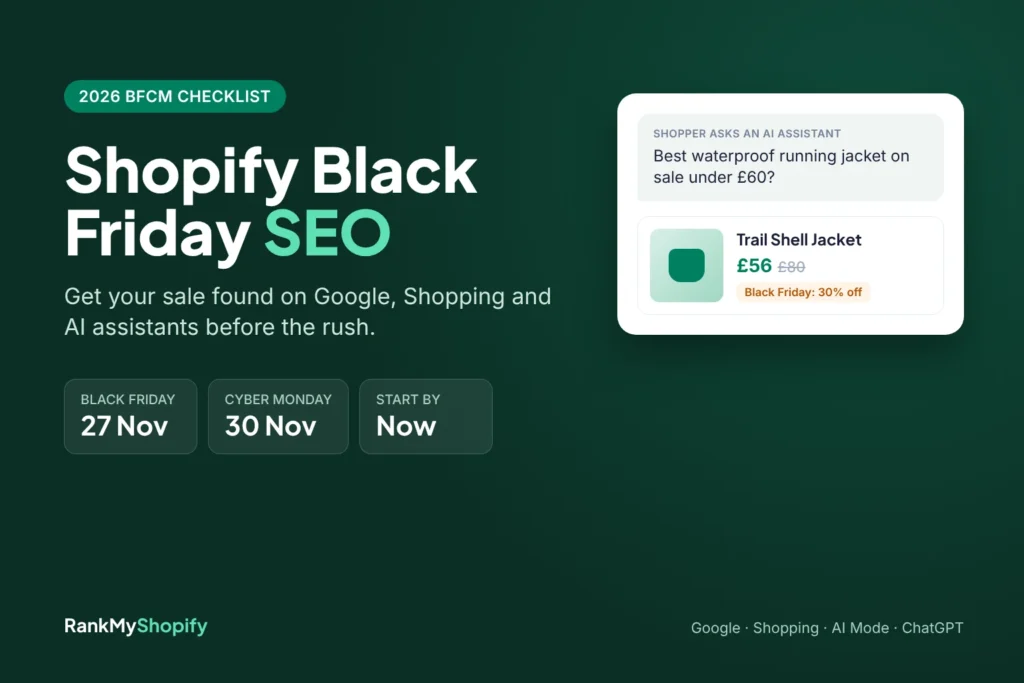
Every November, a lot of Shopify stores do the same thing. They build a shiny new Black Friday page two days before the sale, fill the homepage with banners, and hope Google notices. It usually doesn’t, not in time. And this year there’s a second audience to win over: the AI assistants that shoppers now ask for deals before they ever open a search tab.
Shopify Black Friday SEO is how you fix that. It’s the work of getting your sale pages, prices and product data ready so Google Search, Google Shopping and AI assistants like ChatGPT and Gemini can find your offers and show them correctly over Black Friday and Cyber Monday. This guide gives you a week-by-week checklist you can still start today, written for Shopify specifically.
Quick answer: Use one permanent Black Friday URL that you reuse every year, link it from your homepage, set sale prices with Shopify’s compare-at price so your page, schema and Merchant Center feed all match, write your offer details in plain text, keep your store open to AI channels, and keep the page live after Cyber Monday.
When are Black Friday and Cyber Monday in 2026?
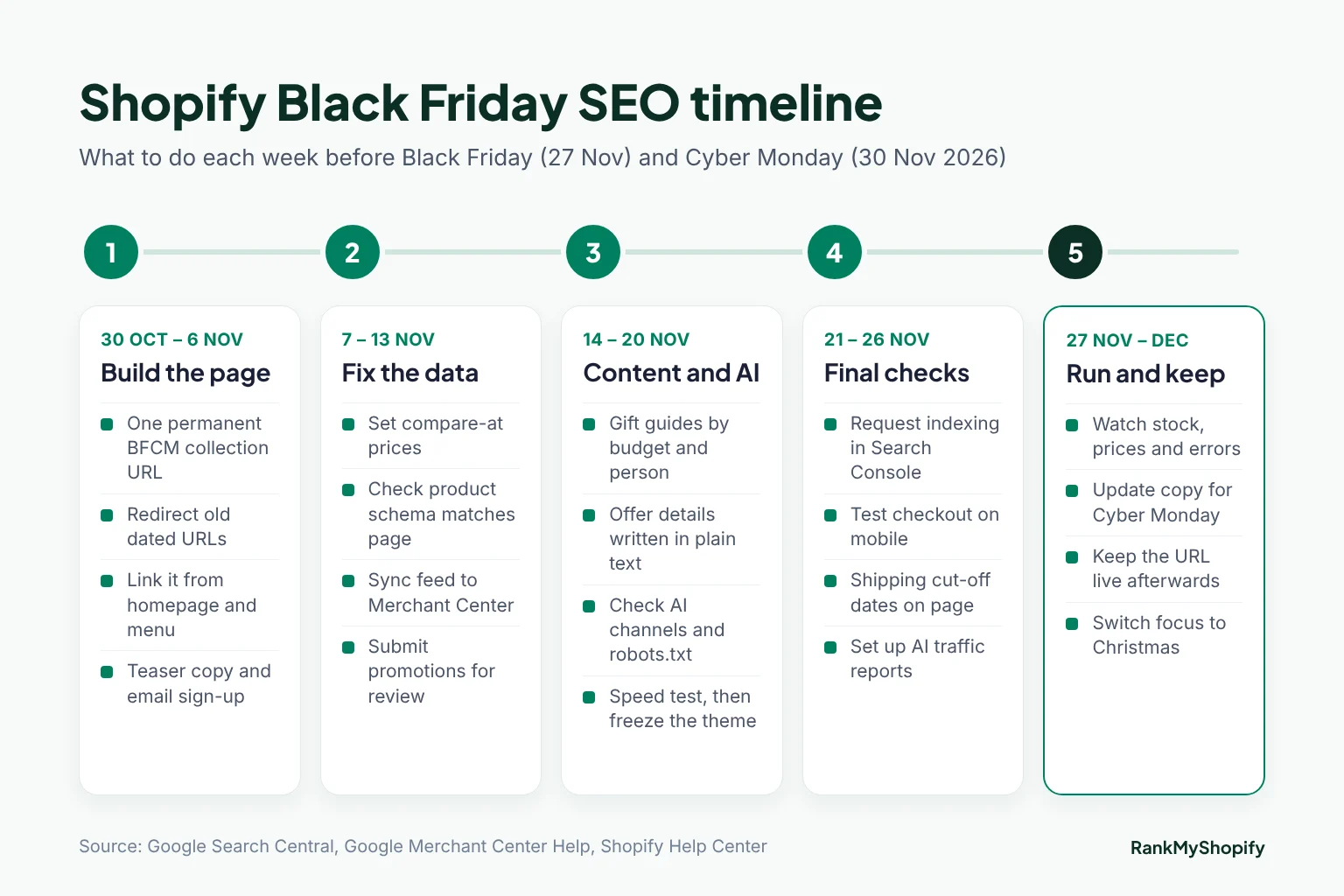
Thanksgiving falls on Thursday 26 November 2026, Black Friday is Friday 27 November and Cyber Monday is Monday 30 November. That gives you just under four weeks from the end of October. It’s tight for brand new pages, but it’s enough time if you reuse what you already have and focus on the fixes below.
Why does Shopify Black Friday SEO matter more this year?
Two reasons: the size of the weekend, and the way people now find deals.
- The weekend keeps growing. Shopify merchants made a record $14.6 billion in sales over Black Friday Cyber Monday 2025, up 27% on the year before, according to Shopify’s BFCM 2025 report.
- AI shopping is now a real traffic source. Adobe found that traffic from AI services to US retail sites rose 693% over the 2025 holiday season, and those visitors converted 31% better than other traffic (Adobe Digital Insights).
- It’s expected to grow again. Adobe’s 2026 forecast projects AI traffic to US retail sites to rise 130% this season, with Black Friday up 95% and Cyber Monday up 88% (Retail TouchPoints). Bear in mind this is a forecast, not a result.
So the shopper who used to type “black friday running jacket deals” into Google might now ask an assistant for “the best waterproof running jacket on sale under £60”. Your store needs to be a good answer to both.
Step 1: Use one permanent Black Friday URL
This is the single most useful thing you can do, and Google has said it plainly. In its best practices for Black Friday and Cyber Monday pages, Google’s advice is to “use a recurring URL, not a new URL for each occurrence of the event.”
A page that has lived on the same address for three years has links, history and trust. A page created last Tuesday has none of that. On Shopify, the cleanest options are:
- A collection:
/collections/black-fridayif your sale is mainly products. This is usually the best choice, because it lists real items with real prices. - A page:
/pages/black-fridayif you want a landing page with offer details, FAQs and links to several sale collections.
Leave the year out of the URL. Put “2026” in the title tag, H1 and copy instead, and update it each year. If you already have old pages like /collections/black-friday-2024, set up 301 redirects to your new permanent URL in Shopify’s URL redirects settings so their links aren’t wasted.
Step 2: Link the page from your homepage and menu
Google also recommends linking your sale page from the homepage, so it’s easy to discover and clearly important. Do it now with teaser copy (“Black Friday starts 27 November, sign up for early access”) instead of waiting for launch day.
Then add links from the places that already get traffic:
- Your main navigation or announcement bar
- Top collections and best-selling product pages
- Gift guides and relevant blog posts
Google needs time to crawl and index changes, so a page that goes live in early November has a much better chance than one that goes live on the day. If you want a refresher on how link structure works on Shopify, see our guide to Shopify internal linking.
Step 3: Write your offer in text, not just in banners
Here’s a mistake we see constantly. The whole offer lives inside a hero image: “UP TO 40% OFF EVERYTHING”. Search engines and AI assistants read text far more reliably than text baked into images. If the details aren’t written on the page, they can’t be quoted.
Your Black Friday page should answer these questions in plain sentences near the top:
- What’s the offer? “30% off all jackets and 20% off everything else.”
- When does it run? Exact start and end dates, with time zone.
- What’s included or excluded? Name the collections.
- Delivery cut-off dates for Christmas, and whether delivery is free.
- Returns policy for holiday orders, especially if it’s extended.
- Codes: whether a discount code is needed or prices are already reduced.
Short, specific, self-contained sentences like these are exactly what AI tools lift into their answers. A short FAQ block at the bottom of the page works well too. Our post on Shopify AI search optimisation goes deeper on writing for assistants.
Step 4: Get your sale prices right everywhere
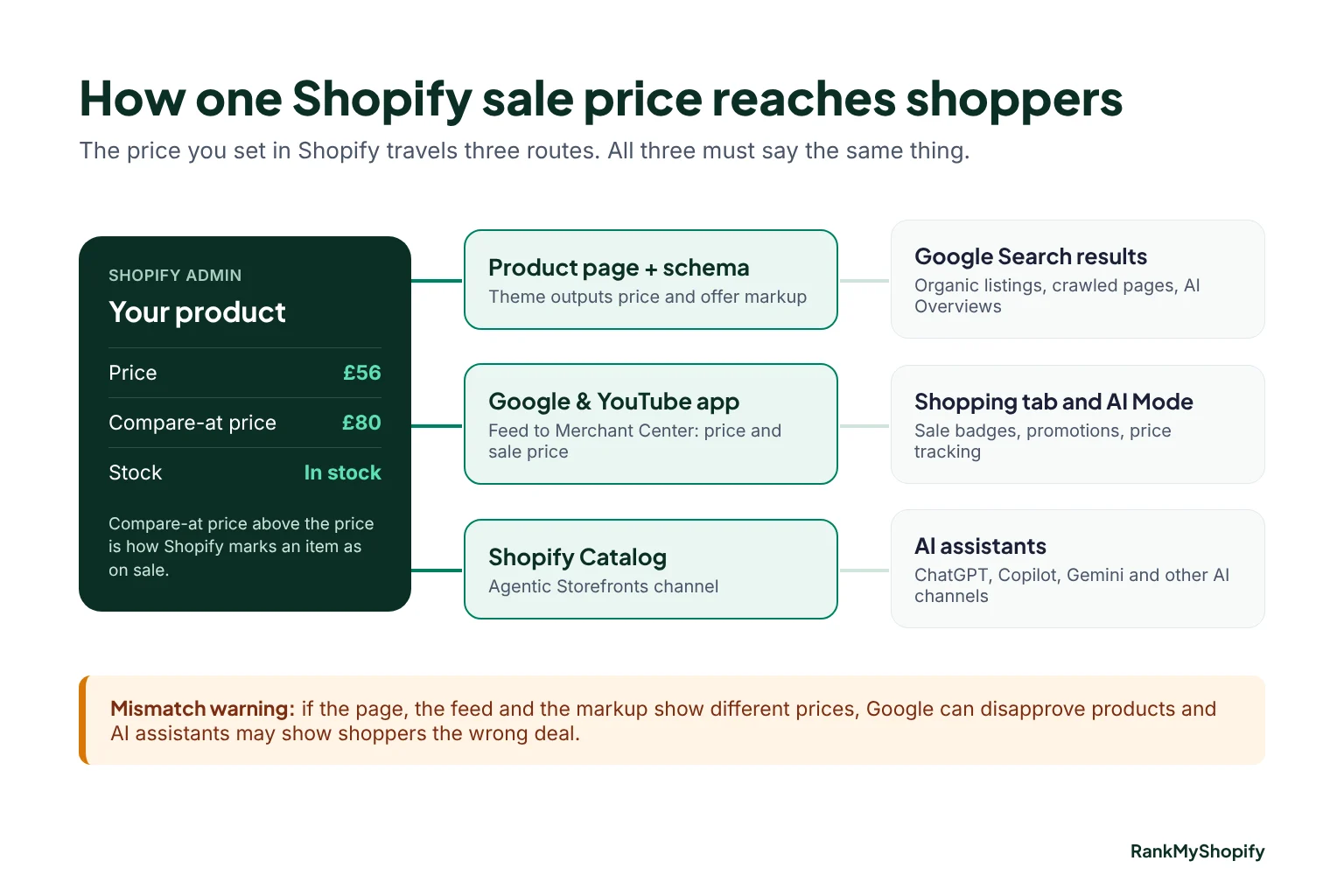
On Shopify, an item shows as on sale when its compare-at price is higher than its price. That one setting feeds three different places, and they all need to agree.
Your product pages and structured data
Most Shopify themes output Product and Offer markup automatically. Check that the price in the markup matches the price a shopper sees, especially if a discount app changes prices with JavaScript after the page loads. Test a few sale products with Google’s Rich Results Test. Our Shopify structured data guide covers what to look for.
Your Google Merchant Center feed
If you use the Google & YouTube app, your compare-at and sale prices sync to Merchant Center. Google explains this in its help page on sale prices and promotions for Shopify stores. A few things worth knowing this season:
- Google wants the original and sale price both shown on your landing page (Merchant Center Help).
- Merchant Center promotions are free to submit but go through review, so submit them a few days before the sale starts.
- Google’s new “Deal Ends” badges have stricter rules between 15 October and 5 January. The deal needs to be at least 10% off and the lowest price for that item in the last 60 days (Search Engine Land). If you discounted a product in October, it may not qualify in late November.
For feed housekeeping more generally, read our Shopify product feed optimisation guide.
Shopify Catalog and AI channels
Shopify shares eligible products with AI channels such as ChatGPT, Copilot and Gemini through its Agentic Storefronts channel. Whatever price you set in Shopify is what these assistants see, so a stale compare-at price or an out-of-stock variant shown as available will be repeated back to shoppers.
Step 5: Get ready for AI shopping assistants
AI shopping isn’t a separate project. It runs on the same product data, plus a few checks:
- Check your AI sales channels. In your Shopify admin, look under Sales channels for the Agentic Storefronts settings and confirm which AI channels are turned on.
- Don’t block AI crawlers by accident. Review your robots.txt and any bot-blocking app. If OAI-SearchBot or Googlebot can’t reach your sale pages, they can’t cite them.
- Support guest checkout and Google Pay. Google’s agentic checkout, which can buy a tracked item for a shopper when it drops to their target price, currently needs merchants to support guest checkout and Google Pay (Glossy).
- Write product titles people actually ask for. “Men’s waterproof trail running jacket, packable” beats “The Storm 2.0”.
Then build content around how people ask. AI queries are long and specific: “gift for a dad who likes cycling under £50”, “best vegan skincare set on sale”. Gift guides grouped by budget and by person answer these directly, and they link naturally to your Black Friday collection.
Step 6: Make sure the store can take the traffic
A slow site loses the sale no matter how well it ranks. Before mid-November:
- Run a mobile speed test on your homepage, sale collection and top product pages.
- Remove apps you no longer use. Countdown timers and pop-up apps added at the last minute are common culprits.
- Compress large hero images and banners.
- Do a full test checkout on a phone.
- Then freeze the theme. No big redesigns during sale week.
If speed is a known problem, our Shopify site speed guide lists the fixes that make the biggest difference.
Step 7: Set up tracking before the sale starts
You can’t improve next year’s sale if you can’t see what happened this year. Set these up in the week before Black Friday:
- Google Search Console: note the impressions and clicks for your Black Friday URL now, so you have a baseline. Use URL Inspection to request indexing once the page is updated.
- GA4: create a report that separates referrals from chatgpt.com, perplexity.ai, gemini.google.com and copilot.microsoft.com.
- Shopify analytics: check sales by channel, including any AI channel orders.
What should you do with the page after Cyber Monday?
Keep it live and indexable. Don’t delete it, redirect it to the homepage or add a noindex tag, because that throws away everything the page built up this year.
Instead, update the copy once the sale ends. Say the event is over, link to your Christmas gift guides, and add an email sign-up for next year’s early access. In January, change the year in the title and H1 so the page is ready long before next November.
Shopify Black Friday SEO checklist at a glance
| Task | Where in Shopify | Do it by |
|---|---|---|
| Create one permanent sale URL (no year) | Products > Collections, or Online Store > Pages | 6 Nov |
| Redirect old dated sale URLs | URL redirects | 6 Nov |
| Link the page from homepage and menu | Online Store > Themes, Navigation | 6 Nov |
| Set compare-at prices and check schema | Products, Rich Results Test | 13 Nov |
| Check feed and submit promotions | Google & YouTube app, Merchant Center | 13 Nov |
| Write offer details and FAQs in text | Collection or page editor | 20 Nov |
| Check AI channels and robots.txt | Sales channels, robots.txt | 20 Nov |
| Speed test and freeze theme | Themes, Apps | 20 Nov |
| Request indexing and set up reports | Search Console, GA4 | 26 Nov |
| Keep page live and update copy | Collection or page editor | 1 Dec |
Common Black Friday SEO mistakes on Shopify
- A new URL every year, starting from zero each time.
- Offer details only in images, so nothing can be read or quoted.
- Prices that don’t match between the page, schema and feed, which can get products disapproved in Merchant Center.
- Deleting or hiding the page in December and losing its history.
- Launching on the day, too late for Google to crawl it properly.
- Fake “was” prices. They break trust, and in the UK and EU they can break pricing rules too.
Need help before the sale?
If you’d like a second pair of eyes on your sale pages, feed and AI visibility before 27 November, our Shopify SEO services team can check the lot and give you a prioritised fix list. Request a free Shopify SEO and AI search audit and we’ll tell you what to fix first with the time you have left.
About RankMyShopify
RankMyShopify is a Shopify-exclusive SEO and digital marketing agency, founded in 2009, with offices in Punjab, India and the USA. We work with ecommerce brands across India, the USA, the UK, Australia and Canada on Shopify SEO, Google Ads, Meta Ads, conversion rate optimisation, content marketing and AI search optimisation.
Frequently Asked Questions
Is it too late to do SEO for Black Friday 2026?
Not if you start now. Building a brand new page this late is risky, but updating an existing collection, fixing prices and schema, linking the page from your homepage and requesting indexing can all be done before 27 November.
Should I use a collection or a page for Black Friday on Shopify?
Use a collection if your sale is mostly products, because it shows real items with prices. Use a page if you need to explain several offers and link to multiple sale collections. Either way, keep the same URL every year.
Should my Black Friday URL include the year?
No. Google recommends a recurring URL such as /sale/black-friday instead of /sale/2026/black-friday. Put the year in the title tag, H1 and page copy, and update it each season.
How do I show sale prices on Google Shopping from Shopify?
Set a compare-at price that is higher than the selling price. The Google & YouTube app syncs this to Merchant Center as a sale price, and Google can then show the original price struck through next to the sale price, as long as both appear on your product page.
How do I get my Black Friday deals into ChatGPT and other AI assistants?
Keep Shopify’s Agentic Storefronts channel turned on, make sure your prices and stock are accurate, don’t block AI crawlers in robots.txt, and write offer details in plain text on your sale page. Nobody can guarantee a mention, but accurate data gives you the best chance.
What should I do with my Black Friday page in December?
Keep it live and indexable. Update the copy to say the sale has ended, link to Christmas gift guides, and add an email sign-up for next year. Deleting or noindexing it throws away the authority it has built.
Ready to scale your Shopify store?
Book a free 30-minute growth call with our Shopify specialists. We’ll audit your store and share an actionable roadmap — no obligations.

Mandeep is a content marketing expert at RankMyShopify. He helps Shopify brands grow organic traffic with search-focused blog content, product and collection page copy, and content built to get recommended by AI search tools like ChatGPT and Google AI Overviews.
