Shoppers no longer start every search on Google’s ten blue links. More of them now ask ChatGPT for “the best linen shirts under £60”, ask Google’s AI Mode to compare running shoes, or ask Copilot which serum suits sensitive skin. These assistants return a short list of products and a few stores. If your Shopify store is not on that list, the shopper never sees you.
Shopify AI search optimisation is the work of making your products and pages easy for these AI assistants to find, understand and trust, so they recommend you when a shopper asks. The good news: most of it builds on the same foundations as solid Shopify SEO. In this guide, we explain how products actually reach AI assistants, what data they rely on, and the practical steps to take first.
What Is Shopify AI Search Optimisation?
AI search optimisation (sometimes called GEO, generative engine optimisation, or AEO, answer engine optimisation) means preparing your store so that AI-powered search tools can use it as a source. For a Shopify store, that covers three things:
- Product visibility: your products appear as shoppable cards when someone asks an assistant for a product recommendation.
- Brand mentions: your store is named when someone asks “where should I buy…” or “what is the best brand for…”.
- Citations: your guides, sizing pages and FAQs are linked as the source behind an AI answer.
Each of these draws on slightly different data, which is why it helps to understand the routes your store’s information takes before you start changing things.
How Shopify Products Reach AI Assistants
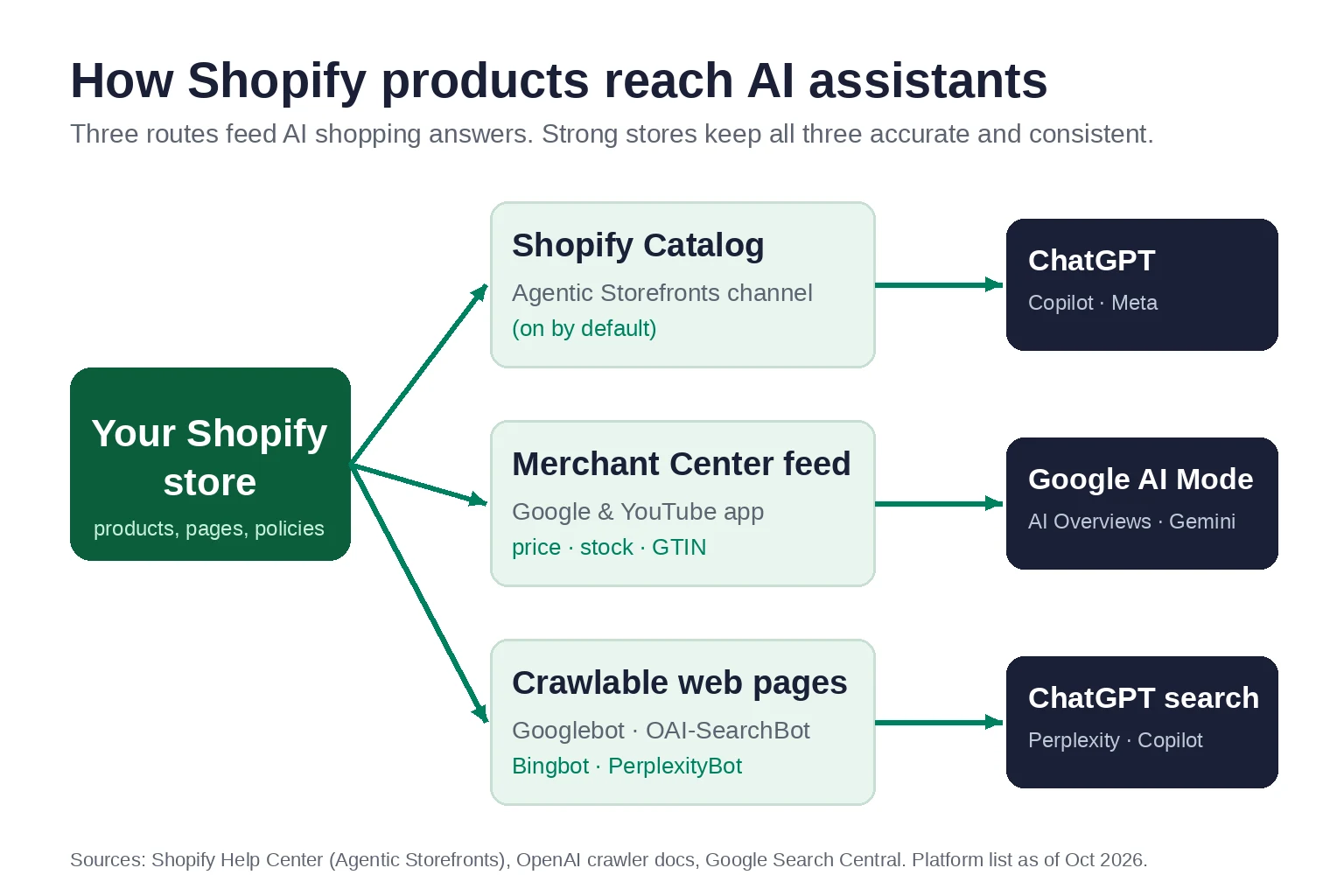
There are three main routes. Strong stores keep all three accurate and consistent with each other.
1. Shopify Catalog and Agentic Storefronts
Shopify now syndicates products to AI channels through its own catalog. According to Shopify’s Help Center, Agentic Storefronts “lets customers discover and purchase your products in AI channels” and is active by default for eligible stores. Supported channels include ChatGPT, Google AI Mode and Gemini, Microsoft Copilot and Meta’s AI surfaces. You can choose which channels to sell on from Sales channels > Agentic in your Shopify admin.
Shopify’s own guidance on ChatGPT shopping adds some basic eligibility rules: your store cannot be password-protected, every listing needs a title and at least one image, and free products are excluded.
2. Google Merchant Center feeds
Google’s AI Mode, AI Overviews and Gemini draw on product data that retailers send through Google Merchant Center, usually via the Google & YouTube app on Shopify. That feed carries price, stock, GTINs, variants and images. If you already run Shopping ads, you have this feed, but it is worth checking its quality. Our guides to Google Shopping setup on Shopify and product feed optimisation walk through the details.
3. Crawlable web pages
AI search tools also read your public pages, the same way search engines do. Google uses Googlebot. OpenAI’s crawler documentation says OAI-SearchBot “is used to surface websites in search results in ChatGPT’s search features”, and that sites which block it “will not be shown in ChatGPT search answers”. Perplexity and Copilot rely on their own crawlers and on Bing’s index.
This route matters most for brand mentions and citations. When a shopper asks a comparison question, assistants look for pages that answer it clearly: buying guides, sizing charts, ingredient explanations and honest comparisons.
Step 1: Check That AI Assistants Can Access Your Store
Before you optimise anything, make sure nothing is blocking access.
- Agentic Storefronts: open Sales channels > Agentic and confirm the channels you want are switched on.
- robots.txt: visit yourstore.com/robots.txt and check that Googlebot, Bingbot and OAI-SearchBot are not disallowed. Some apps and custom
robots.txt.liquidedits block AI crawlers without the owner realising. - Password and geo blocks: remove storefront passwords once you launch, and check that bot-protection or geo-blocking apps are not stopping legitimate crawlers.
- Indexing: Google says pages need to be “indexed and eligible to be shown in Google Search with a snippet” to appear as links in AI features. Check the Pages report in Search Console for important product and collection pages that are excluded.
Duplicate URLs are a common hidden problem on Shopify. If you have not cleaned them up, read our guide on fixing duplicate content on Shopify.
Step 2: Make Your Product Data Complete and Specific
AI assistants match products to very specific requests. A shopper might ask for “a waterproof hiking jacket for women, packable, under $150”. The assistant can only recommend your jacket if your data says it is waterproof, packable, designed for women and priced under $150.
Write descriptive product titles
Lead with what the product is, then the key attribute. “Aurora Women’s Packable Waterproof Hiking Jacket” gives an assistant far more to work with than “Aurora Jacket”. Keep brand names, but do not rely on them alone.
Fill in every attribute you can
- GTINs and barcodes so your product can be matched reliably across sources.
- Variants with clear size, colour and material values rather than codes.
- Specifications such as dimensions, weight, ingredients, materials and care instructions. Shopify recommends technical specs, sizing guides and care instructions because they help AI tools tell similar products apart.
- Product type, tags and metafields that use the words shoppers actually use.
Write descriptions in full sentences
Keyword lists do not help. Explain who the product is for, what problem it solves and how it compares with alternatives. This is the same work that drives good rankings on Google. Our guide to Shopify product page SEO shows how to structure it, and our Shopify keyword research guide helps you find the language your customers use.
Collection pages matter too. A well-written collection page with a clear introduction and buying advice is often what an assistant cites for broad “best X” questions. See how to optimise Shopify collection pages.
Step 3: Keep Structured Data Accurate and Consistent
Structured data (schema markup) labels your price, availability, brand and reviews in a format machines can read. Google is clear that you do not need any special AI-only markup. Its guidance on AI features says “there’s also no special schema.org structured data that you need to add”. What it does ask is that your structured data matches the visible content on the page.
For Shopify stores, that means:
- One clean source of Product and Offer schema per product page. Duplicates from your theme and an SEO app send mixed signals.
- Price, currency and availability in the schema that match the page and your Merchant Center feed.
- Organization schema with your real business name, logo, contact details and social profiles, so assistants can connect your brand across the web.
- BreadcrumbList schema that reflects your collection structure.
Our complete guide to Shopify structured data covers each type, the common mistakes and how to test your pages.
Step 4: Answer Buyer Questions in Plain Text
AI assistants work by answering questions. The stores they cite are usually the ones that answer those questions clearly on the page, in text rather than inside images or hidden tabs.
- Product FAQs: sizing, fit, compatibility, ingredients, delivery times and returns.
- Policy pages: Shopify notes that AI assistants may reference your terms, privacy and refund policies, so keep them current and public.
- Buying guides: “how to choose”, “X vs Y” and “best X for Y” articles that link to the relevant collections.
- Short, direct answers: answer the question in the first sentence or two under each heading, then add detail.
Shopify also offers a free Knowledge Base app that generates FAQs from your catalogue and shows what information AI agents are asking for. It is a useful way to spot gaps.
A blog is the natural home for buying guides. If you are not sure where to start, our Shopify blog SEO guide and Shopify content marketing plan explain how to pick topics that bring in buyers, not just readers.
Step 5: Build Trust Signals Beyond Your Own Store
When a shopper asks for the “best” brand in a category, AI assistants weigh what other sources say about you, not just what your own site says. Shopify lists third-party reviews and ratings among the factors that may influence recommendations.
- Collect genuine reviews on your product pages and on independent platforms. Never buy or fake reviews.
- Earn mentions in gift guides, niche blogs, industry press and comparison articles. Our Shopify link building guide covers ethical ways to do this.
- Keep your brand details consistent across your website, Google Business Profile, social profiles and marketplaces.
- Show real expertise: author names, founder stories and clear “about us” pages help both shoppers and assistants judge who is behind the store.
Step 6: Keep Pages Fast and Readable
Google recommends providing a good page experience and keeping important content in text form. Slow, script-heavy pages are harder for crawlers to process and frustrate the shoppers that AI assistants send to you. If your store relies on many apps, start with our guide to Shopify site speed optimisation.
Step 7: Measure AI Search Traffic
You cannot improve what you do not measure. A few practical ways to track AI search on Shopify:
- Shopify admin: orders from AI channels appear with channel or referrer attribution, according to Shopify’s Agentic Storefronts documentation.
- Google Search Console: traffic from AI Overviews and AI Mode is included in the Performance report under the “Web” search type.
- Google Analytics 4: create a custom channel group or exploration that separates referrals from chatgpt.com, perplexity.ai, copilot.microsoft.com and gemini.google.com.
- Manual checks: once a month, ask the main assistants the questions your customers ask and note whether your store appears.
Our Shopify analytics and reporting service sets this up as part of a single dashboard alongside SEO and paid channels.
Common Myths About AI Search for Shopify
“You need special AI files or markup”
Google states there are no additional technical requirements and no special files needed to appear in AI Overviews or AI Mode. Files such as llms.txt may help some tools navigate your content, but no major engine has said they are required. Spend your time on product data and content first.
“AI search replaces SEO”
AI assistants rely on crawlable, indexed, well-structured pages, which is exactly what SEO delivers. The stores that do well in AI answers are usually the stores that already do SEO properly.
“You can pay to be recommended”
Organic AI recommendations are not for sale. Some platforms now show ads in AI experiences, but those are labelled separately. The organic route depends on data quality, relevance and trust.
Where to Start This Week
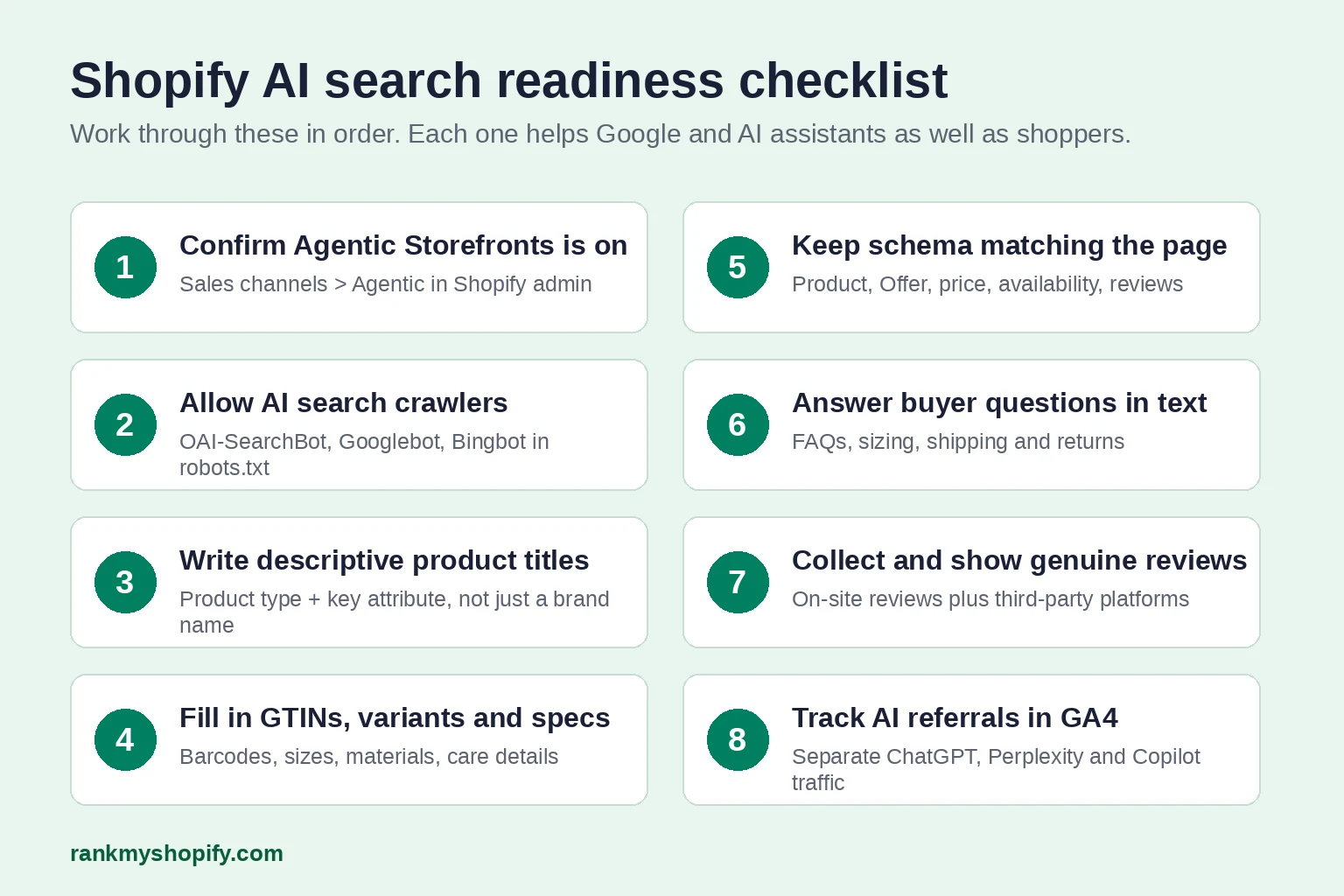
- Confirm Agentic Storefronts is on and that robots.txt allows the main search crawlers.
- Rewrite the titles and descriptions of your 20 best-selling products using the guidance above.
- Add missing GTINs and fix any Merchant Center errors.
- Test your top product and collection pages for duplicate or mismatched schema.
- Add a short FAQ to each of your top collections.
- Set up an AI referral report in GA4 so you have a baseline.
For a deeper review of your store’s foundations, use our practical Shopify website audit checklist.
Get a Free Shopify AI Search Audit
At RankMyShopify, we work only on Shopify and Shopify Plus. Our Shopify SEO services now cover AI search visibility, from product data and schema to content that assistants cite. For one UK client, that work led to citations in ChatGPT, Google AI Overviews, AI Mode and Gemini alongside first-page Google rankings. You can see the full results on our UK page.
Request your free Shopify AI search audit and we will show you where your store stands in AI search today and what to fix first.
Frequently Asked Questions
How do I get my Shopify products into ChatGPT?
For most stores, Shopify’s Agentic Storefronts channel shares your products with ChatGPT through Shopify Catalog and is on by default for eligible stores. Check it under Sales channels > Agentic, make sure your store is not password-protected, and give every product a clear title and at least one image. Also allow OAI-SearchBot in robots.txt so ChatGPT search can read your pages.
Do I need special schema markup for Google AI Overviews?
No. Google says there is no special structured data required for AI Overviews or AI Mode. Standard Product, Offer, Organization and BreadcrumbList schema that accurately matches your visible page content is what matters.
Is AI search optimisation different from Shopify SEO?
It builds on the same foundations: crawlable pages, accurate product data, clear content and trust signals. The main additions are paying closer attention to product attributes, answering buyer questions directly in text, and checking product feeds for AI shopping channels.
How can I see if AI assistants send traffic to my Shopify store?
Check AI channel attribution on orders in your Shopify admin, create a GA4 report that separates referrals from chatgpt.com, perplexity.ai and similar sources, and review the Search Console Performance report, which includes AI Overviews and AI Mode traffic.
How long does it take to appear in AI search results?
There is no fixed timeline. Feed and product data changes can be picked up within days, while brand mentions and citations build over months as your content and reputation grow. Nobody can guarantee a specific placement in AI answers.
Ready to scale your Shopify store?
Book a free 30-minute growth call with our Shopify specialists. We’ll audit your store and share an actionable roadmap — no obligations.

