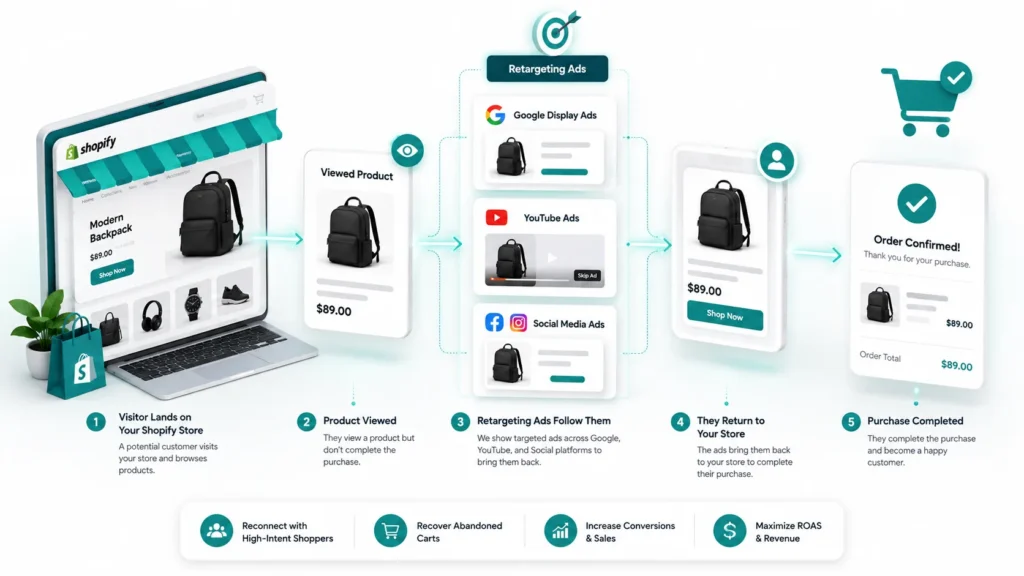
What Is Shopify Google Ads Remarketing?
Shopify Google Ads remarketing is a paid advertising method that re-shows your products to people who already visited your store, viewed a product, or abandoned a cart without checking out. Rather than paying to reach cold audiences again, you are paying to reach warm shoppers who already know your brand.
Google draws a technical line between “remarketing” and “retargeting” that most Shopify merchants use interchangeably in practice. Remarketing typically refers to Google’s own audience and email based re-engagement tools, while retargeting is the broader term for showing paid display or social ads to past visitors. For most Shopify stores, both terms describe the same practical goal: getting an abandoned shopper back to checkout.
At RankMyShopify, our team treats Google retargeting Shopify campaigns as one part of a wider growth stack that also includes Shopify SEO services, Shopify Google Ads management, Shopify Facebook Ads agency work, and Shopify email marketing agency support, because remarketing performs best when it is not carrying the whole funnel alone.
Why Cart Abandonment Makes Remarketing Essential for Shopify Stores
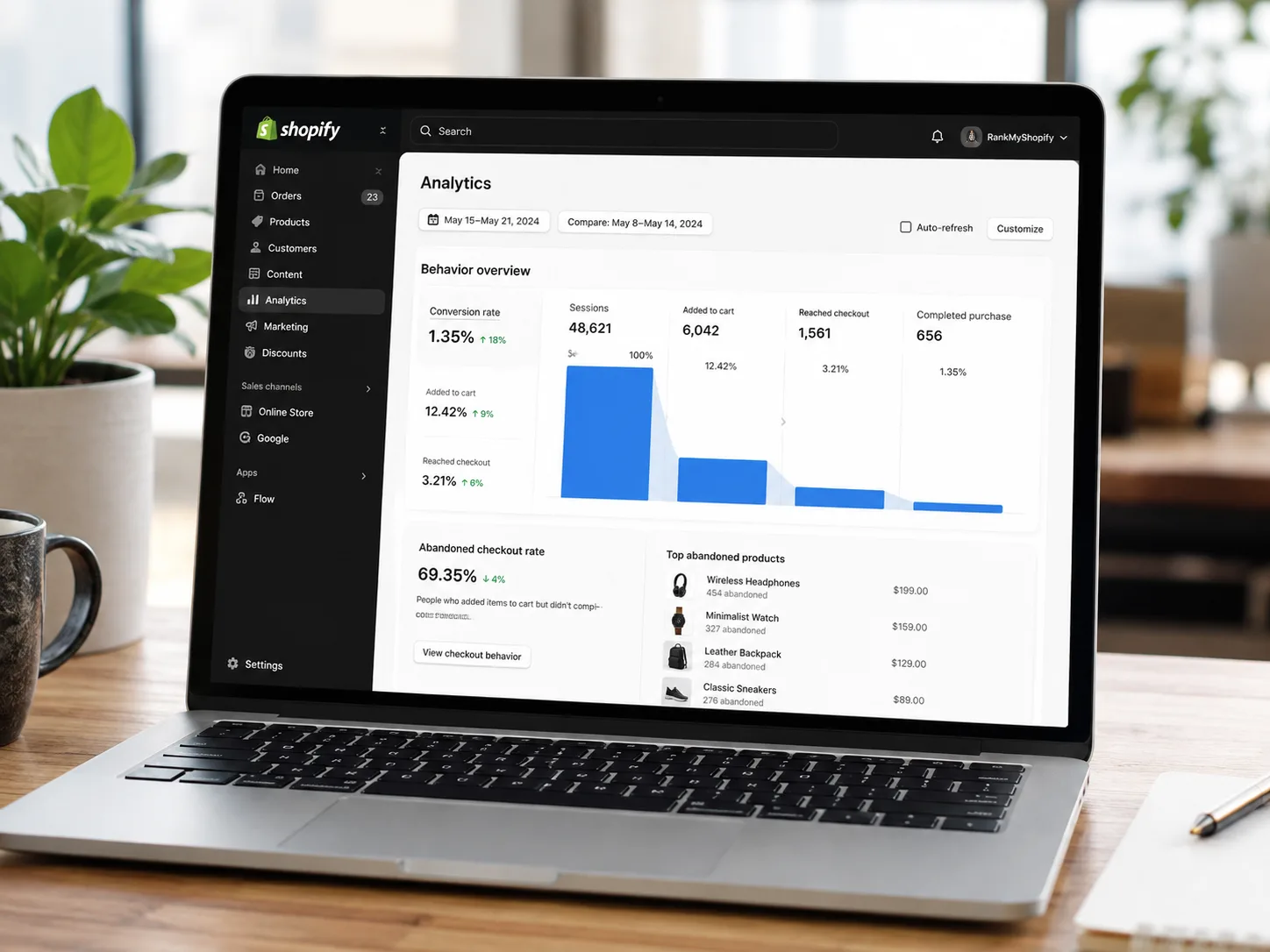
Cart abandonment is the single biggest reason Shopify remarketing Google Ads campaigns exist in the first place. The global average cart abandonment rate sits at 70.22% in 2026, according to Baymard Institute’s analysis of more than 50 independent studies. That means for every 10 shoppers who add a product to their cart, roughly 7 leave without paying.
Shopify stores tend to perform slightly better than the general ecommerce average, largely because of Shop Pay and a streamlined checkout, but the gap is still significant.
| Metric | 2026 Benchmark |
|---|---|
| Global average cart abandonment rate | 70.22% (Baymard Institute) |
| Typical Shopify store abandonment rate | 67% to 70% |
| Mobile cart abandonment rate | 80% to 85% |
| Desktop cart abandonment rate | 66% to 73% |
| Recoverable revenue (US and EU estimate) | $260 billion (Baymard Institute) |
| Typical retargeting cost per click | $0.95 to $1.25 |
The takeaway for Shopify store owners is simple: even a small improvement in cart recovery, driven by a well structured remarketing campaign, can add meaningful revenue without spending extra on new traffic.
How Does Google Ads Dynamic Remarketing Work on Shopify?
Google Ads dynamic remarketing shopify works by connecting your Shopify product catalogue to Google Ads, then automatically building ads that feature the exact products a visitor looked at or added to their cart. The system uses three connected components: a synced product feed, a tracking tag, and audience lists built from on-site behaviour.
Google Merchant Center and Your Product Feed
Your Shopify products need to be listed in Google Merchant Center before dynamic remarketing can pull product images, titles, and prices into an ad. The Google & YouTube sales channel in Shopify handles this feed sync automatically, which removes the need to build or maintain a separate product data file.
The Google Ads Tag and Conversion Tracking
A Google tag and conversion ID tie your store’s activity back to Google Ads, so the platform knows when someone viewed a product, added to cart, or completed a purchase. This tag is installed through the Google & YouTube channel rather than through custom code.
Why the Old Additional Scripts Method No Longer Works
If you set up Shopify dynamic remarketing years ago by pasting a tag into theme.liquid or the checkout’s Additional Scripts box, that setup is no longer supported. Shopify retired the legacy checkout customisation option and made Additional Scripts view-only, so Customer Events is now the required method for tracking checkout activity. Any store still relying on the old scripts should assume its remarketing tracking is broken or incomplete.
GA4 as the Data Backbone
GA4 needs to be correctly configured alongside Google Ads and Merchant Center, since it is often the source of truth for events like add to cart, begin checkout, and purchase. Without accurate GA4 ecommerce tracking, remarketing audiences are built on incomplete data, which quietly wastes ad spend on the wrong shoppers.
How to Set Up Shopify Google Ads Remarketing
Setting up Shopify Google Ads remarketing correctly in 2026 follows a specific order. Skipping a step, such as launching campaigns before the feed is approved, is one of the most common reasons dynamic ads never leave “learning” status.
- Link your Shopify store to Google Merchant Center. Approve your product feed and confirm every product listed is active and policy compliant.
- Install the Google Ads tag through the Google & YouTube sales channel. Connect your Google Ads account inside Shopify rather than editing theme code.
- Confirm Customer Events are firing correctly. Check that view item, add to cart, begin checkout, and purchase events are all recording in GA4 and Google Ads.
- Build your remarketing audiences. In Google Ads Audience Manager, create segments such as “cart abandoners (14 days)”, “product viewers (30 days)”, and “past purchasers” for suppression.
- Create a Display or Performance Max campaign. Choose a Sales goal, select dynamic ads, and link the campaign to your Merchant Center feed.
- Set frequency and duration caps. Cap impressions at roughly 3 to 5 per day per person and set a duration limit of 14 to 30 days so warm audiences do not go cold from ad fatigue.
- Launch with a small daily budget. Confirm return on ad spend is positive before scaling spend upward.
Google Retargeting Shopify: Best Audience Segments to Target
The strongest Google retargeting Shopify campaigns are not one audience; they are several smaller, purpose built lists that each get a different message and budget.
- Cart abandoners (7 to 14 days): The highest intent audience, since these shoppers were closest to completing checkout.
- Product page viewers (30 days): A broader, lower intent group that still benefits from dynamic ads showing the exact product viewed.
- Category browsers: Useful for stores with a wide catalogue, where showing a related product can outperform showing the single item viewed.
- Past purchasers (suppressed or upsell only): Exclude from cold acquisition style remarketing, or target separately with complementary product ads.
How Much Should You Budget for Shopify Remarketing Ads?
As a general guide, most Shopify stores allocate around 20% to 30% of their total paid media budget to retargeting, with the remainder split across prospecting and Shopify Google Ads management for new customer acquisition. For a store spending $1,000 to $5,000 a month on ads, that typically means $200 to $1,500 directed toward remarketing.
Retargeting cost per click generally runs lower than cold prospecting, often in the $0.95 to $1.25 range, because you are reaching people who already recognise your brand. Exact figures vary by industry, average order value, and competition, so treat these as planning benchmarks rather than fixed numbers. For a personalised budget recommendation, get a proposal from RankMyShopify by calling 9888923755 or emailing info@rankmyshopify.com.
Google Ads Remarketing vs Facebook Retargeting for Shopify Stores
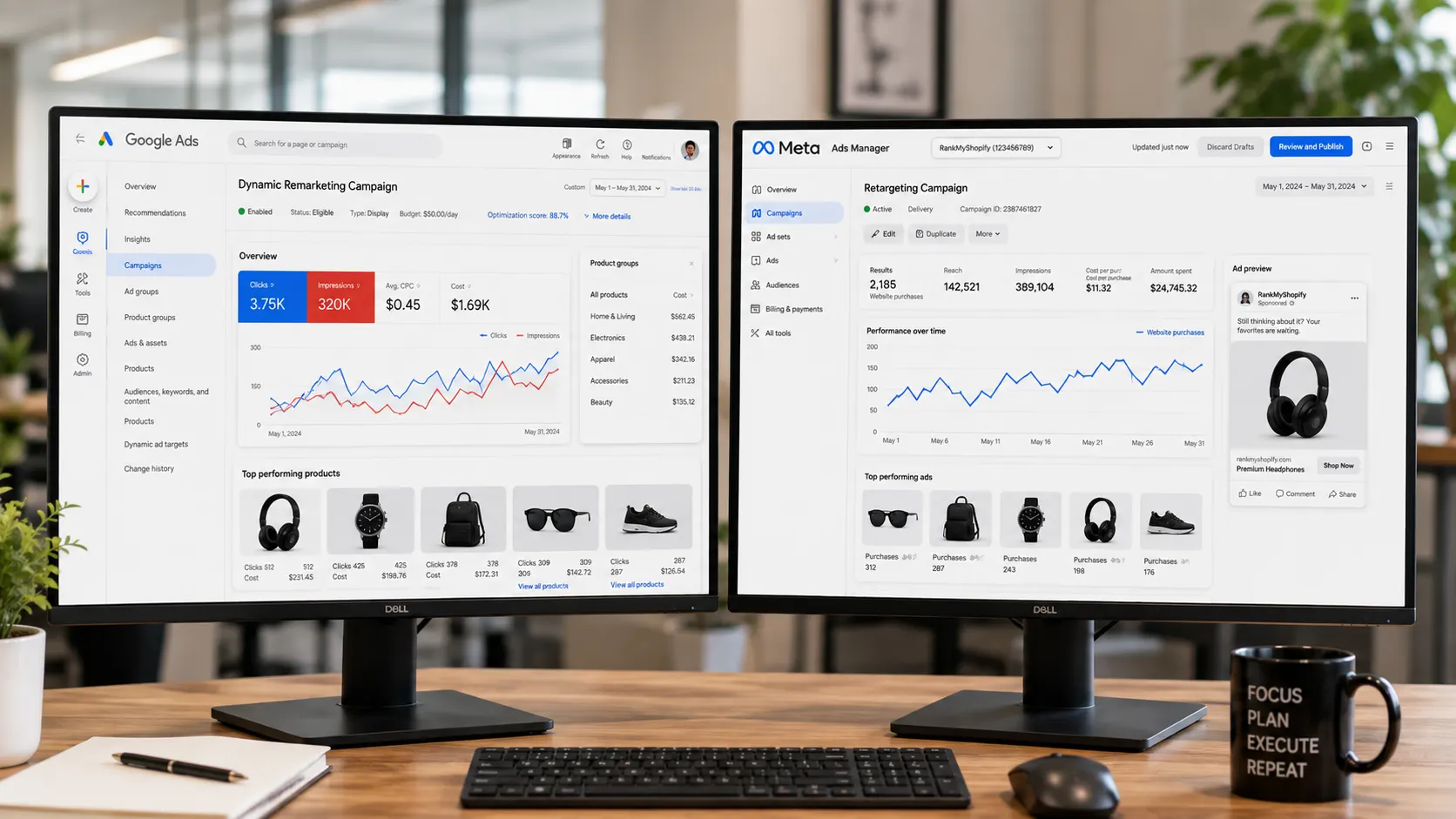
Shopify merchants often ask whether Google remarketing or Meta (Facebook and Instagram) retargeting performs better. In practice, the two channels tend to reach shoppers at different points in their day and work best when run together rather than as a straight either-or choice.
| Factor | Google Ads Remarketing | Facebook/Meta Retargeting |
|---|---|---|
| Reach | Google Display Network, over 2 million sites and apps | Facebook, Instagram, and Audience Network |
| Ad format strength | Dynamic product ads pulled from Merchant Center feed | Highly visual, social-native carousel and video ads |
| Typical CPC | Around $0.95 to $1.25 | Often similar or slightly lower, varies by niche |
| Best for | Shoppers already searching or browsing related products | Shoppers scrolling social feeds, strong for impulse categories |
| Setup complexity | Requires Merchant Center, GA4, and Google Ads tag | Requires Meta Pixel and Conversions API through Shopify |
A working partnership with a Shopify Facebook Ads agency alongside your Google Ads management often outperforms relying on a single platform, since the two channels catch shoppers in different moments and rarely fully overlap in audience.
Common Shopify Dynamic Remarketing Mistakes to Avoid
Even experienced Shopify merchants run into avoidable problems with remarketing campaigns.
- Launching before the product feed is approved. Disapproved or pending products cannot appear in dynamic ads.
- No frequency cap. Showing the same shopper an ad more than 5 times a day tends to damage brand perception rather than drive sales.
- Ignoring GA4 accuracy. If purchase and add to cart events are not tracked correctly, remarketing budgets get spent chasing the wrong audiences.
- Treating remarketing as a replacement for organic growth. Paid remarketing recovers existing traffic; it does not generate new demand the way ongoing Shopify SEO services do.
- Running remarketing in isolation from email. Email typically reaches the 20% to 40% of abandoners who gave you an address; remarketing should focus on the anonymous visitors email cannot reach.
A Real-World Example
For example, if you run a Shopify fashion store with 3,000 products and no remarketing in place, you are likely losing the majority of your traffic to the 70%+ average cart abandonment rate before it ever converts. A proper Shopify remarketing Google Ads setup, combined with a 14-day cart abandoner audience, dynamic product ads, and a modest daily budget, would typically start recovering a measurable share of that lost traffic within the first few weeks, without any additional spend on new customer acquisition.
How RankMyShopify Helps with Shopify Remarketing
RankMyShopify has worked exclusively with Shopify stores since 2009, and our Shopify Google Ads management service is built to sit alongside the rest of your growth stack rather than compete with it. Our team handles Merchant Center setup, GA4 and Customer Events configuration, dynamic remarketing audience structure, and ongoing budget optimisation.
Because remarketing performs best as part of a wider strategy, we also offer Shopify SEO services to grow the organic traffic that feeds your remarketing lists, Shopify Facebook Ads agency management to cover social retargeting, and Shopify email marketing agency support to recover the abandoners email can reach before they ever need a paid ad. Store owners across India, the USA, the UK, Australia, and Canada work with our team for this combined approach.
Ready to scale your Shopify store?
Book a free 30-minute growth call with our Shopify specialists. We’ll audit your store and share an actionable roadmap — no obligations.

